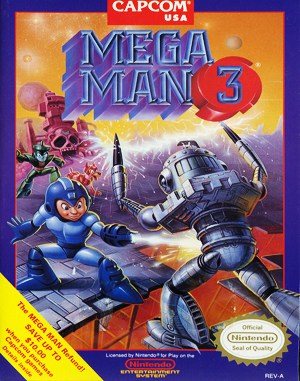
Mega Man 3 – The Robots are Revolting Overview
Mega Man 3 on PC DOS is a classic side scrolling action game focused on precise movement, careful timing, and learning enemy patterns. The original manual contains missing and misplaced sections, so this article reorganizes everything into a clear and readable guide, with special attention to joystick selection and calibration.
Table of Contents
- Overview of Mega Man 3 on PC
- How to Start the Game
- Initial Setup Menu
- Joystick Selection and Calibration
- Choosing a Robot Master
- Health, Lives, and Survival
- Keyboard and Joystick Controls
- Special Keys and Weapon Menu
- Items and Power Ups
- Master Weapons and Energy
- Boss Battles and Dr. Wily
- Continue and Start Over
Overview of Mega Man 3 on PC
Mega Man 3 is built around challenging platforming stages filled with traps, ladders, moving platforms, and hostile robots. Each stage ends with a powerful Robot Master. Defeating these bosses grants new weapons that can dramatically change how later stages are played.
How to Start the Game
- Turn on your computer and insert the Mega Man disk into drive A.
- Type A: and press Enter.
- Type MM and press Enter to launch the game.
- Configure the setup options using the arrow keys.
- Insert disk number two when prompted.
- Graphics Card choose CGA for 4 colors, or EGA and Tandy for 16 colors.
- Animation enables or disables animated backgrounds. Turning this off helps slower PCs.
- Masking controls whether characters appear in front of or behind scenery.
- Sound turns sound effects on or off.
- Joystick set to ON to use a joystick, OFF to use the keyboard.
Joystick Selection and Calibration
Using a joystick can greatly improve the feel of Mega Man 3, but only if it is properly set up. Incorrect calibration may cause drifting or inaccurate jumps.
- In the setup menu, set Joystick to ON.
- During gameplay, press Esc to open the Weapon Select menu.
- Physically center the joystick.
- Press F4 to register the center position.
- Press F1 to recalibrate for precise control.
Choosing a Robot Master
The Robot Master selection screen allows you to choose one of six enemies. Move left or right using the arrow keys or joystick. Mega Man’s eyes follow your selection. Press Enter or joystick Button 1 to begin the stage.
Health, Lives, and Survival
Mega Man starts with three lives and a Power Meter shown at the top left of the screen. Taking damage drains this meter. When it reaches zero, one life is lost. If lives remain, Mega Man respawns at an earlier point in the stage.
Keyboard and Joystick Controls
- Move Left left arrow or joystick left.
- Move Right right arrow or joystick right.
- Climb Up up arrow or joystick up.
- Climb Down down arrow or joystick down.
- Jump J key or joystick Button 1.
- Jump Down J key plus down arrow or Button 1 plus joystick down.
- Fire Weapon space bar or joystick Button 2.
Holding the jump button longer results in a higher jump. Mega Man can shoot while running, jumping, or climbing ladders. Learning when to make short jumps instead of long ones is critical.
Special Keys and Weapon Menu
- F9 pause or resume the game.
- F10 quit the game and return to DOS.
- Esc open the Weapon Select menu.
Items and Power Ups
- Power Pill restores part of the Power Meter.
- Extra Life Capsule grants one additional life.
- Weapon Energy Pellet restores energy for the current weapon.
- Energy Canister fully restores the Power Meter when used.
Master Weapons and Energy
Each Robot Master provides a unique weapon with its own energy meter. When the meter is depleted, that weapon cannot be used until energy is restored. The Plasma Cannon is always available and uses the main Power Meter.
Boss Battles and Dr. Wily
Boss battles occur at the end of each stage. The boss Power Meter appears at the top right. Each successful hit reduces it. Choosing the correct weapon and learning attack patterns is the key to victory.
Continue and Start Over
If all lives are lost, the game offers two options. Press C to continue from the start of the current stage, or press S to end the game and start over.